Guide d’import
Formats pris en charge et méthodes d’import
Section intitulée « Formats pris en charge et méthodes d’import »Manic EMU prend en charge les formats de fichiers de jeu suivants :
- Bandai WonderSwan/Color WS/WSC (.ws .wsc .pc2 .pcv2)
- Adobe Flash FLASH (.swf)
- Nintendo Wii (.rvz .wbfs .ciso .wia .iso .wad .dol .elf)
- Nintendo GameCube NGC (.gcm .gcz .rvz .iso .dol .elf)
- Commodore Amiga (.adf .adz .dms .fdi .ipf .hdf .hdz .lha .slave .info .cue .ccd .nrg .mds .iso .chd .uae .m3u .zip .7z .rp9)
- Commodore 64 C64 (.d64 .d71 .d80 .d81 .d82 .g64 .g41 .x64 .t64 .tap .prg .p00 .crt .bin .zip .gz .d6z .d7z .d8z .g6z .g4z .x6z .cmd .m3u .vfl .vsf .nib .nbz .d2m .d4m)
- Neo Geo Pocket/Color NGP/NGPC (.ngp .ngc .ngpc .npc)
- PC-Engine PCE (.pce .sgx .cue .ccd .chd .toc .m3u)
- Symbian (.sis .sisx .n-gage .7z .zip .rar)
- Microsoft DOS (.zip .dosz .exe .com .bat .iso .cue .img .ima .vhd .jrc .tc .m3u .conf)
- Sun Microsystems J2ME (.jar)
- DOOM (.wad .iwad .pwad)
- Atari Jaguar (.j64 .jag .rom .abs .cof .bin .prg)
- Atari Lynx (.lnx .o)
- Atari 7800 ProSystem (.a78 .bin .cdf)
- Atari 5200 SuperSystem (.a52 .bin)
- Atari 2600 (.a26 .bin)
- Arcade (.zip .7z .cmd)
- Sega Dreamcast (.cdi .gdi .chd .cue .bin .m3u)
- SONY PlayStation (.cue .m3u .pbp .chd .ccd)
- Nintendo Pokémon Mini (.min)
- Nintendo Virtual Boy (.vb .vboy)
- Nintendo 64 (.n64 .z64 .v64)
- Sega Saturn(.iso .chd .ccd)
- Sega Mega Drive/Genesis (.md .gen .smd .bin)
- Sega Mega-CD/Sega CD (.chd .iso)
- Sega Super 32X/Genesis 32X (.32x)
- Sega Master System (.sms .bms .bin)
- Sega Game Gear (.gg .bin)
- Sega SG-1000 (.sg)
- SONY PSP (.elf .iso .cso .prx .pbp .chd)
- Nintendo 3DS (.3ds .app .cci .cxi .cia)
- Nintendo DS (.ds .nds)
- Nintendo Game Boy (.gb)
- Nintendo Game Boy Color (.gbc)
- Nintendo Game Boy Advance (.gba)
- Nintendo Entertainment System (.fc .nes .unf .unif)
- Nintendo Famicom Disk System (.fds)
- Nintendo Super Entertainment System (.sfc .snes .fig .smc)
- Fichiers compressés (.zip .7z)
Formats de sauvegarde :
- Bandai WonderSwan/Color WS/WSC (.srm)
- Adobe Flash FLASH (.json)
- Commodore Amiga (.nvr)
- Commodore 64 C64 (.nvr)
- Neo Geo Pocket/Color NGP/NGPC (.flash)
- PC-Engine PCE (.srm)
- Microsoft DOS (.pure.zip)
- Sun Microsystems J2ME (.J2meJS.srm .freej2me.srm)
- DOOM (.dsg)
- Atari Jaguar (.srm)
- Sega Dreamcast (VMU Memory Units)
- SONY PlayStation (.srm .mcd .mcr)
- Nintendo Pokémon Mini (.eep)
- Nintendo Virtual Boy (.srm)
- Nintendo 64 (.srm)
- Sega Saturn (.srm .bkr)
- Sega Mega Drive/Genesis (.srm)
- Sega Mega-CD/Sega CD (.srm)
- Sega Super 32X/Genesis 32X (.srm)
- Sega Master System (.srm)
- Sega Game Gear (.srm)
- Sega SG-1000 (.srm)
- SONY PSP (.psp.sav)(Zip File Type)
- Nintendo 3DS (.3ds.sav)(Zip File Type)
- Nintendo DS (.dsv)
- Nintendo Game Boy (.sav)
- Nintendo Game Boy Color (.sav)
- Nintendo Game Boy Advance (.sav)
- Nintendo Entertainment System (.srm)
- Nintendo Famicom Disk System (.srm)
- Nintendo Super Entertainment System (.srm)
Plusieurs méthodes d’import, selon le contexte :
- Fichiers locaux et cloud : importez depuis le stockage de l’appareil ou iCloud via le navigateur de fichiers.
- Transfert sans fil : envoyez les fichiers en WiFi depuis un navigateur web.
- Collage inter-appareils : avec Apple Handoff, copiez un fichier sur Mac ou un autre appareil et collez-le dans l’app.
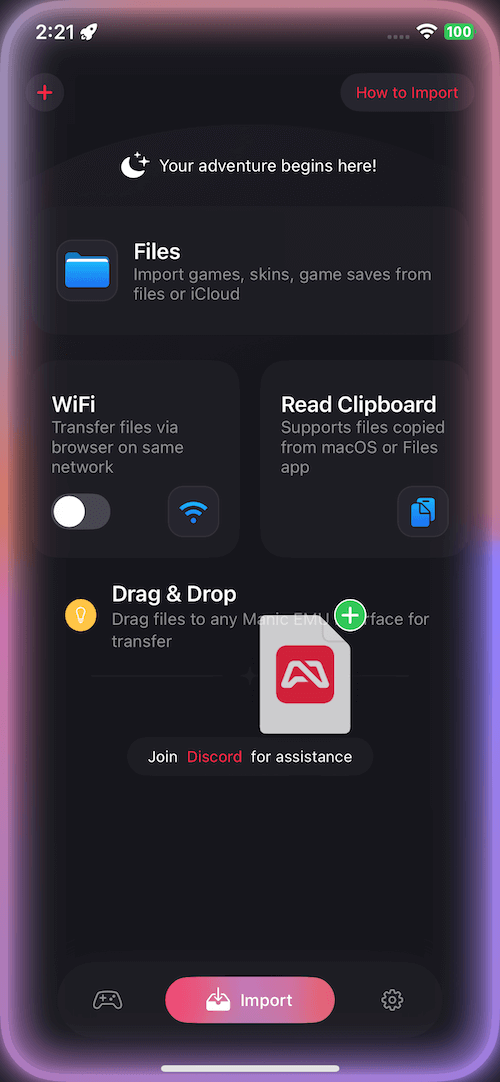
- Glisser-déposer : glisser-déposer natif iOS — appui long sur un fichier, puis déposez-le dans l’interface de l’app.
- Services cloud : Google Drive, Dropbox, OneDrive, Baidu Cloud et Alibaba Cloud.
- Protocoles : accédez à un NAS ou un serveur privé via WebDAV/SMB.
Guides pas à pas
Section intitulée « Guides pas à pas »📁 Import via le navigateur de fichiers
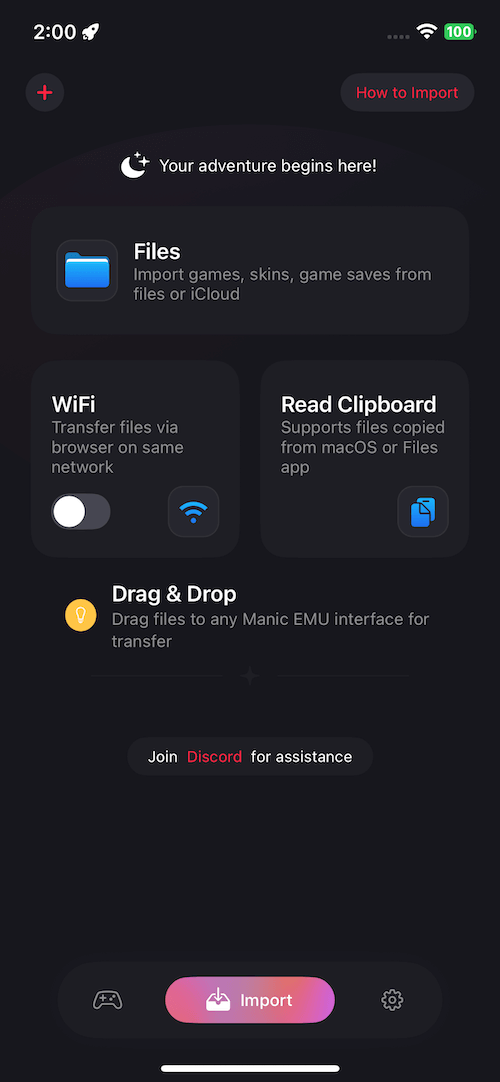
Section intitulée « 📁 Import via le navigateur de fichiers »- Lancez l’app Manic EMU.
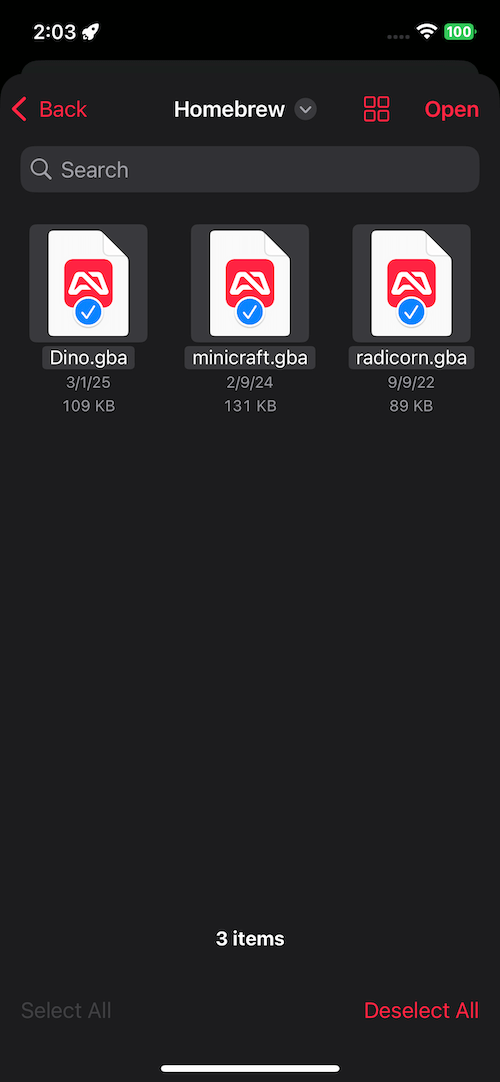
- Allez dans Import → Files.
- Sélectionnez le fichier cible pour terminer l’import.
 |  |
|---|
📶 Transfert WiFi
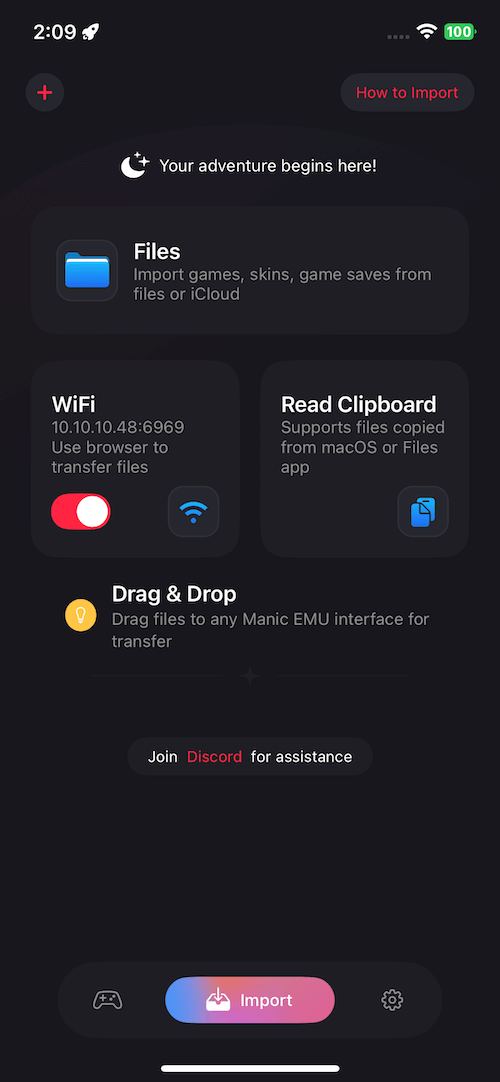
Section intitulée « 📶 Transfert WiFi »- Allez dans Import → WiFi Transfer et activez l’interrupteur.
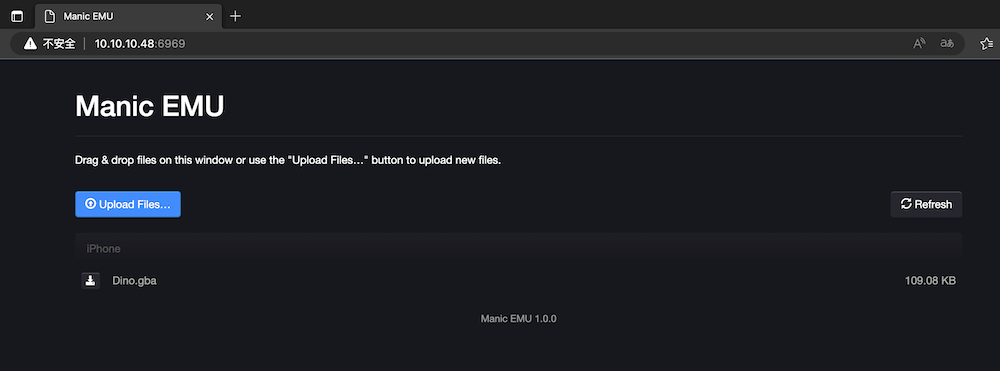
- Saisissez l’adresse IP affichée dans un navigateur, sur ordinateur ou mobile.
- Envoyez les fichiers via l’interface du navigateur.
📋 Import depuis le presse-papiers
Section intitulée « 📋 Import depuis le presse-papiers »- Copiez un fichier de jeu dans une autre app.
- Ouvrez l’écran Import dans Manic EMU.
- Touchez Read Clipboard pour reconnaître le fichier.
✨ Import par glisser-déposer
Section intitulée « ✨ Import par glisser-déposer »- Depuis l’app Fichiers ou toute app qui gère le glisser-déposer :
- Appui long sur un fichier, glissez-le dans l’interface de Manic EMU,
- Relâchez pour terminer le transfert.
 |  |
|---|
☁️ Services cloud et protocoles
Section intitulée « ☁️ Services cloud et protocoles »- Touchez le bouton + en haut à gauche de l’écran Import (à droite dans les régions arabes).
- Choisissez un service cloud ou saisissez les paramètres du protocole.
- Une fois connecté, suivez les mêmes étapes que pour un fichier local.
Astuce : WebDAV/SMB sont parfaits pour un NAS, le stockage d’un routeur, et plus encore.